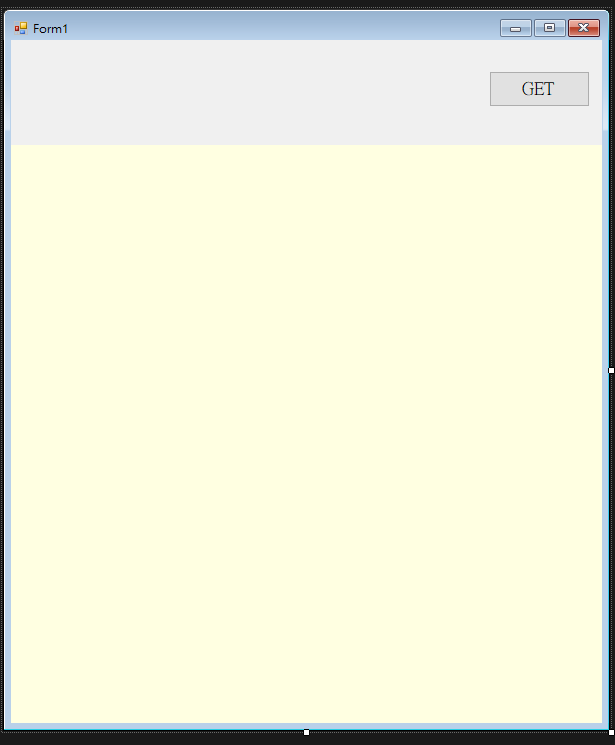
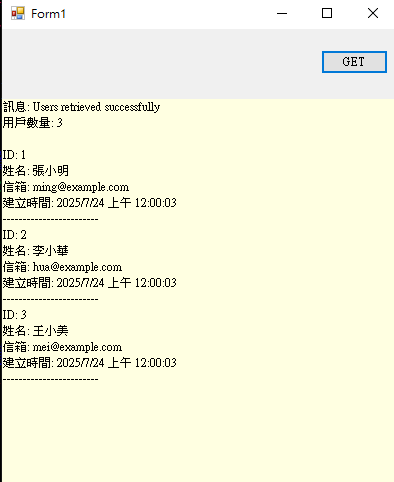
建置RESTful API Server 以及用C# 取得RESTful API https->【GET】

RockyLinux and apache HTTP server
程式語言 PHP(Server) and C#(client)
資料庫Mysql8
 

基礎環境建立

# 更新系統
sudo dnf update -y

# 安裝 Apache HTTP Server
sudo dnf install httpd -y
sudo systemctl enable httpd
sudo systemctl start httpd

# 安裝 MySQL
sudo dnf install mysql-server -y
sudo systemctl enable mysqld
sudo systemctl start mysqld
sudo mysql_secure_installation

PHP 環境配置


# 安裝 PHP 及相關模組
sudo dnf install php php-mysqlnd php-json php-curl php-mbstring -y
# 重啟 Apache 載入 PHP 模組
sudo systemctl restart httpd


安裝 Composer(PHP 套件管理工具)

# 下載並安裝
Composer curl -sS https://getcomposer.org/installer | php
sudo mv composer.phar /usr/local/bin/composer
sudo chmod +x /usr/local/bin/composer

建立 Slim 專案

# 建立專案目錄
sudo mkdir -p /var/www/html/api
cd /var/www/html/api
# 透過 Composer 安裝 Slim
composer require slim/slim:"4.*"
composer require slim/psr7
composer require slim/http


Apache 配置

在 /etc/httpd/conf/httpd.conf:

<Directory "/www/api/">
    AllowOverride All  #要開All  不然.htaccess失敗就無法rewrite
    # Allow open access:
    Require all granted
</Directory>

<Directory /www/api/public>
        AllowOverride All
        RewriteEngine On
        RewriteCond %{REQUEST_FILENAME} !-f
        RewriteRule ^(.*)$ index.php [QSA,L]
</Directory>


*註解-Slim Framework 的位置

 
你的伺服器架構:
┌─────────────────┐
│  RockyLinux                     │ ← 作業系統
├─────────────────┤
│  Apache                           │ ← 網頁伺服器(處理 HTTP 請求)
├─────────────────┤
│  PHP                                │ ← 程式語言環境
├─────────────────┤
│  Slim Framework             │ ← 你的 API 程式碼(在 PHP 裡面)
├─────────────────┤
│  MySQL                           │ ← 資料庫
└─────────────────┘


vi /www/api/index.php

<?php
require __DIR__ . '/vendor/autoload.php';

use Slim\Factory\AppFactory;
use Psr\Http\Message\ResponseInterface as Response;
use Psr\Http\Message\ServerRequestInterface as Request;

// 資料庫配置
$dbConfig = [
    'host' => 'localhost',
    'dbname' => 'api_db',
    'username' => 'api_user',
    'password' => 'your_password'
];

// 建立資料庫連接函數
function getDB($config) {
    $dsn = "mysql:host={$config['host']};dbname={$config['dbname']};charset=utf8mb4";
    return new PDO($dsn, $config['username'], $config['password'], [
        PDO::ATTR_ERRMODE => PDO::ERRMODE_EXCEPTION,
        PDO::ATTR_DEFAULT_FETCH_MODE => PDO::FETCH_ASSOC
    ]);
}

$app = AppFactory::create();
$app->addErrorMiddleware(true, true, true);

// 根路由
$app->get('/', function (Request $request, Response $response) {
    $data = ['message' => 'Slim API with MySQL is working!'];
    $response->getBody()->write(json_encode($data));
    return $response->withHeader('Content-Type', 'application/json');
});

// 取得所有用戶
$app->get('/api/users', function (Request $request, Response $response) use ($dbConfig) {
    try {
        $pdo = getDB($dbConfig);
        $stmt = $pdo->query("SELECT * FROM users ORDER BY created_at DESC");
        $users = $stmt->fetchAll();
        
        $data = [
            'message' => 'Users retrieved successfully',
            'users' => $users,
            'count' => count($users)
        ];
        
        $response->getBody()->write(json_encode($data));
        return $response->withHeader('Content-Type', 'application/json');
    } catch (Exception $e) {
        $error = ['error' => 'Database connection failed: ' . $e->getMessage()];
        $response->getBody()->write(json_encode($error));
        return $response->withStatus(500)->withHeader('Content-Type', 'application/json');
    }
});

$app->run();
?>


1. 安裝 PDO MySQL 擴展

# 安裝 PHP MySQL 擴展 sudo dnf install php-pdo php-mysqlnd -y # 重啟 Apache 載入擴展 sudo systemctl restart httpd


2. 建立資料庫和表格

 
# 登入 MySQL
mysql -u root -p

# 建立資料庫
CREATE DATABASE api_db CHARACTER SET utf8mb4 COLLATE utf8mb4_unicode_ci;

# 建立用戶和授權
CREATE USER 'api_user'@'localhost' IDENTIFIED BY 'your_password';
GRANT ALL PRIVILEGES ON api_db.* TO 'api_user'@'localhost';
FLUSH PRIVILEGES;

# 使用資料庫
USE api_db;

# 建立 users 表格
CREATE TABLE users (
    id INT AUTO_INCREMENT PRIMARY KEY,
    name VARCHAR(100) NOT NULL,
    email VARCHAR(150) UNIQUE NOT NULL,
    created_at TIMESTAMP DEFAULT CURRENT_TIMESTAMP,
    updated_at TIMESTAMP DEFAULT CURRENT_TIMESTAMP ON UPDATE CURRENT_TIMESTAMP
);

# 插入測試資料
INSERT INTO users (name, email) VALUES 
('張小明', 'ming@example.com'),
('李小華', 'hua@example.com'),
('王小美', 'mei@example.com');

EXIT;


.C#

<!-- 在 .csproj 檔案中添加 --> <PackageReference Include="Newtonsoft.Json" Version="13.0.3" />


powershell
Install-Package Newtonsoft.Json


csharp
using System;
using System.Net.Http;
using System.Threading.Tasks;
using System.Windows.Forms;
using Newtonsoft.Json;

namespace RESTful2_test
{
    public partial class Form1 : Form
    {
        private static readonly HttpClient httpClient = new HttpClient();
        
        public Form1()
        {
            InitializeComponent();
        }

        private async void button1_Click(object sender, EventArgs e)
        {
            try
            {
                // 呼叫 API
                string apiUrl = "https://api.jyan-tech.com/api/users";
                string jsonResponse = await httpClient.GetStringAsync(apiUrl);
                
                // 解析 JSON 回應
                ApiResponse response = JsonConvert.DeserializeObject<ApiResponse>(jsonResponse);
                
                // 顯示結果在 RichTextBox 中
                richTextBox1.Clear();
                richTextBox1.AppendText($"訊息: {response.Message}\n");
                richTextBox1.AppendText($"用戶數量: {response.Count}\n\n");
                
                foreach (User user in response.Users)
                {
                    richTextBox1.AppendText($"ID: {user.Id}\n");
                    richTextBox1.AppendText($"姓名: {user.Name}\n");
                    richTextBox1.AppendText($"信箱: {user.Email}\n");
                    richTextBox1.AppendText($"建立時間: {user.CreatedAt}\n");
                    richTextBox1.AppendText("------------------------\n");
                }
            }
            catch (HttpRequestException ex)
            {
                MessageBox.Show($"網路請求錯誤: {ex.Message}", "錯誤", MessageBoxButtons.OK, MessageBoxIcon.Error);
            }
            catch (JsonException ex)
            {
                MessageBox.Show($"JSON 解析錯誤: {ex.Message}", "錯誤", MessageBoxButtons.OK, MessageBoxIcon.Error);
            }
            catch (Exception ex)
            {
                MessageBox.Show($"未知錯誤: {ex.Message}", "錯誤", MessageBoxButtons.OK, MessageBoxIcon.Error);
            }
        }
        
        // 記得在 Form 關閉時釋放資源
        protected override void Dispose(bool disposing)
        {
            if (disposing)
            {
                httpClient?.Dispose();
            }
            base.Dispose(disposing);
        }
    }
}


建置RESTful API Server 以及用C# 取得R    建置RESTful API Server 以及用C# 取得R


← 回列表